

Access
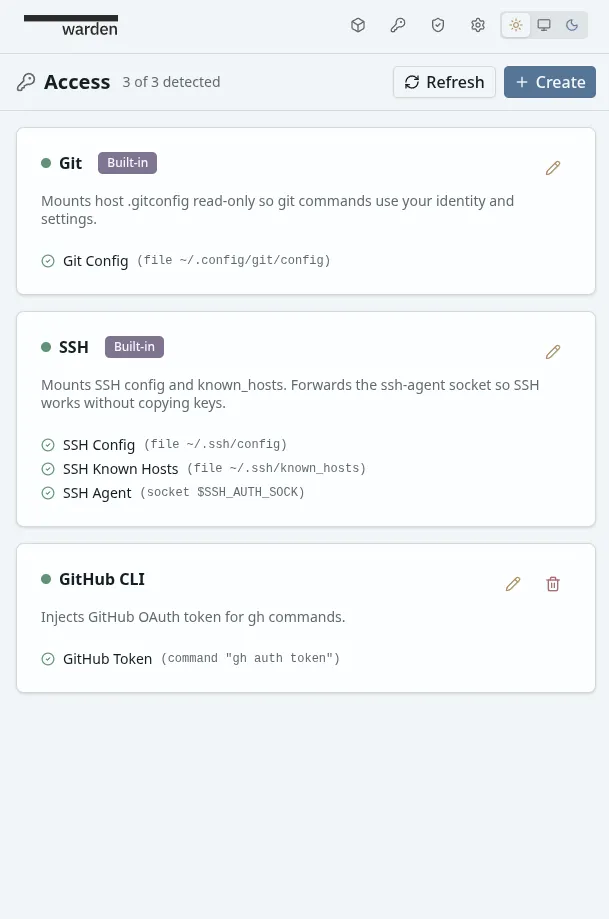
The Access system shares host credentials with containers without storing or copying them. Warden detects what’s available on your host (Git config, SSH agent, GitHub tokens, AWS credentials, etc.) and injects them into containers at creation time.
Warden never stores credentials — only the recipes for how to obtain and inject them. Credentials are resolved from sources at container start and injected immediately. Nothing is persisted.
Core Concepts
Section titled “Core Concepts”Access Items
Section titled “Access Items”An Access Item is a named group of related credentials. Each item has a label (e.g., “Git”, “SSH”, “AWS CLI”) and contains one or more credentials that work together.
Examples:
- Git — mounts
.gitconfigso git commands use your identity - SSH — forwards config, known_hosts, and agent socket
- GitHub CLI — injects OAuth token as
GH_TOKEN - AWS CLI — injects access keys and config file
Credentials
Section titled “Credentials”A Credential is the atomic unit within an Access Item. Each credential has two components:
- Source — where to get the value on the host (env var, file, socket, or command)
- Injection — where to deliver it in the container (env var, file mount, or socket mount)
Sources are tried in order — the first one detected wins. If none are detected, the credential is silently skipped (partial resolution).
Source Types
Section titled “Source Types”| Source | Example | Use case |
|---|---|---|
| Env var | GITHUB_TOKEN | Tokens, API keys already in your shell |
| File | ~/.gitconfig | Config files, certificates |
| Socket | $SSH_AUTH_SOCK | SSH agent socket |
| Command | gh auth token | Tokens in keychains, dynamic values |
Injection Types
Section titled “Injection Types”| Injection | Example | Use case |
|---|---|---|
| Env var | GH_TOKEN=ghp_xxx | Tools that read env vars |
| File mount | Mount ~/.aws/config → /home/warden/.aws/config | Config files |
| Socket mount | Mount SSH agent socket | SSH agent forwarding |
Detection vs Resolution
Section titled “Detection vs Resolution”Detection checks if a credential’s source exists on the host without reading its value. This is fast and safe — used to show availability status before container creation.
Resolution actually reads the values and prepares injections. This happens at container creation time, right before the container starts.
Built-in Items
Section titled “Built-in Items”Warden ships with two pre-configured Access Items. You can edit them to customize their behavior, and reset to defaults if needed.
Mounts your host .gitconfig (read-only) so git commands inside the container use your identity and settings (user.name, user.email, aliases, etc.).
What it does:
- Looks for
~/.gitconfigor~/.config/git/config(first found wins) - Mounts it read-only at
/home/warden/.gitconfig.host - The container entrypoint includes it via
git config --global include.path
When to enable: Always, unless you want the container to use a different git identity.
Forwards SSH config, known_hosts, and the SSH agent socket so git-over-SSH and SSH commands work without copying private keys into the container.
What it does:
- Mounts
~/.ssh/configread-only (filtered to removeIdentitiesOnlydirectives that would block the forwarded agent) - Mounts
~/.ssh/known_hosts(read-write, so new hosts can be added) - Forwards the SSH agent socket from
$SSH_AUTH_SOCKand sets the env var inside the container
When to enable: Whenever you need git-over-SSH (git clone git@github.com:...) or direct SSH access to other machines.
Creating Custom Access Items
Section titled “Creating Custom Access Items”Navigate to the Access section and create a new item.
Example 1: GitHub CLI
Section titled “Example 1: GitHub CLI”The GitHub CLI (gh) stores its OAuth token in the OS keychain. On the host, gh auth token extracts it. Inside the container, gh checks the GH_TOKEN env var.
Setup:
- Click Create on the Access page
- Label: “GitHub CLI”
- Description: “Injects GitHub OAuth token for gh commands”
- Add a credential:
- Label: “GitHub Token”
- Source: Command —
gh auth token - Injection: Env var —
GH_TOKEN
- Click Save, then Test to verify
What happens at container start:
- Warden runs
gh auth tokenon your host - Captures the token from stdout
- Injects it as
GH_TOKEN=gho_xxxinto the container ghcommands inside the container work automatically
Example 2: AWS CLI (Multiple Credentials)
Section titled “Example 2: AWS CLI (Multiple Credentials)”AWS CLI needs multiple pieces: access key, secret key, and optionally a config file. This shows how one Access Item can group several credentials.
Setup:
- Click Create on the Access page
- Label: “AWS CLI”
- Add credential 1:
- Label: “AWS Access Key ID”
- Source: Env var —
AWS_ACCESS_KEY_ID - Injection: Env var —
AWS_ACCESS_KEY_ID
- Add credential 2:
- Label: “AWS Secret Access Key”
- Source: Env var —
AWS_SECRET_ACCESS_KEY - Injection: Env var —
AWS_SECRET_ACCESS_KEY
- Add credential 3:
- Label: “AWS Config”
- Source: File —
~/.aws/config - Injection: Mount file —
/home/warden/.aws/config(read-only)
- Click Save
Partial resolution: If you have the env vars set but no ~/.aws/config file, Warden injects the env vars and silently skips the file mount. Each credential resolves independently.
How Resolution Works
Section titled “How Resolution Works”When you create or restart a container with Access Items enabled:
-
Detection — Warden checks which credentials have available sources (file exists? env var set? command succeeds?). The UI shows green/gray dots per credential.
-
Selection — You choose which Access Items to enable for this container via the project configuration form.
-
Resolution — At container start, Warden reads each enabled credential’s source and prepares injections (env vars, bind mounts, socket mounts).
-
Injection — The container starts with all resolved values in place.
-
No persistence — Credentials exist only in the container’s runtime environment. When the container stops, they’re gone.
Testing Access Items
Section titled “Testing Access Items”Both the create and edit dialogs include a Test button that resolves the current form state and shows exactly what would be injected:
- Which credentials were detected and which weren’t
- The exact env vars, file mounts, and socket mounts that will be created
- Which source was matched for each credential
Use this to verify items work before saving or attaching them to a project.